QA Bridge
What is QA Bridge?
PantoAI QA Bridge connects the PantoAI dashboard to your local environment so you can execute mobile tests on real devices connected to your machine. Keep the bridge running to unlock local testing features from the dashboard.
How it works
PantoAI Dashboard (Browser) ↔ PantoAI QA Bridge (this tool) ↔ Your local devices (USB/Wi‑Fi)
QA Bridge App



Common Errors
PantoAI QA Bridge.app is damaged and can’t be opened. You should move it to the Bin.
This error message is misleading: https://discussions.apple.com/thread/253714860?sortBy=rank
Signing the final build with an Apple certificate will resolve this issue. This is currently a work in progress.
Workaround: Run the following command after opening Terminal.app (assuming you have downloaded and extracted the app in the Downloads folder)
Open Terminal.app and run the following.
xattr -c /Applications/PantoAI\ QA\ Bridge.app
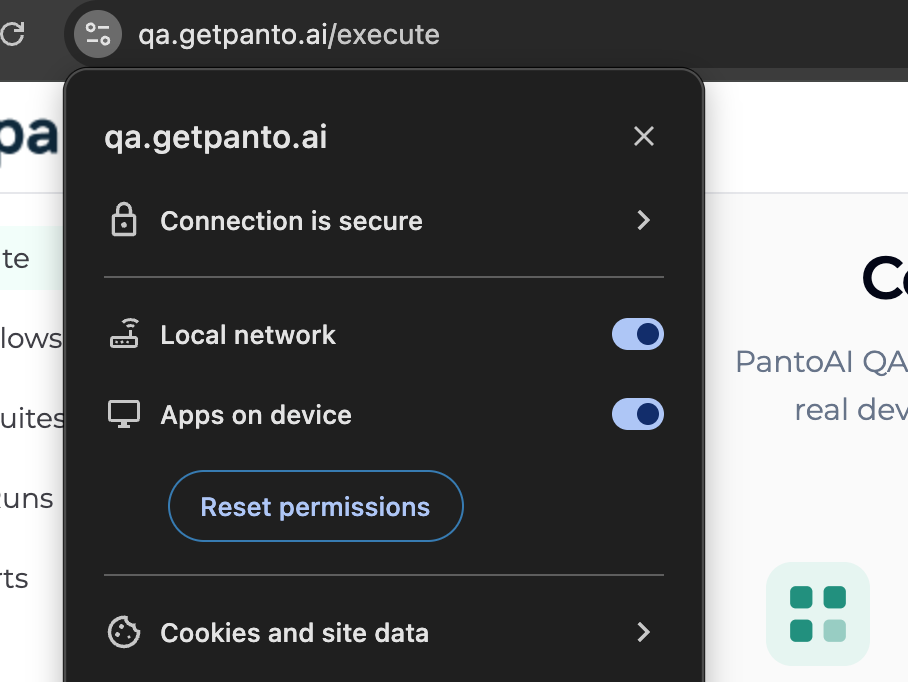
Bridge is running but website shows “Not Connected”
Enable Chrome device permissions for the site.
Steps:
- Open the Panto QA website in Chrome
- Click the settings/tune icon near the address bar
- Enable:
- Apps on device
- Refresh the page
QA Bridge CLI
Alternatively, if you already have a development environment set up, you can install our CLI tool directly using pipx.
For MacOS and Linux
pipx install pantoqa_bridge
For Windows
python3 -m pip install pantoqa_bridge
To start the bridge server, run this
pantoqa_bridge
Prerequisites
Before running the CLI, ensure that the following dependencies are installed and properly configured on your system:
- Python – Required to run the CLI tool
- Android Debug Bridge (ADB) – Required for communicating with Android devices . It'll auto download if not installed.
- (Optional) Node.js and npm – Required for Appium and related tooling.
- (Optional) Appium with the UIAutomator2 driver – Used for Appium based automation
Make sure all the above tools are available in your system PATH.
QA Bridge Android app.
Coming soon